




Free Pinterest Downloader Chrome Extension: What's Included in 2026
Last Updated: March 2026
Looking for a free Pinterest downloader Chrome extension that actually works? Most free tools either limit you to 5-10 images, show you ads, or are just glorified trials. Pinpasta offers a genuinely usable free tier: ZIP downloads of the first 20 pins per board, copy to Figma up to 30 pins per paste, and original full-resolution images—all without paying. This guide explains exactly what you get for free, what the limitations are, and when upgrading to Pro ($29 lifetime) makes sense. No bait-and-switch, no hidden paywalls, just honest information about what's free and what's not.
What's Included in Pinpasta's Free Pinterest Downloader
Pinpasta's free tier is a genuinely functional tool, not a 3-day trial or a crippled demo. Here's what you get without paying anything:
Free ZIP Downloads (First 20 Pins Per Board)
You can download any Pinterest board as a ZIP using this Pinterest board downloader—free, capped at the first 20 pins of the board. The cap applies per board, not per day. So you could download a 20-pin ZIP from Board A, then another from Board B immediately after. There's no daily cap or monthly quota—just a 20-pin limit per ZIP.
For many use cases, 20 pins is enough:
- Small client moodboards (around 20 images)
- Themed inspiration boards (color palettes, typography, etc.)
- Curated reference collections (top examples from a larger board)
If you need ZIPs of Pinterest boards with more than 20 pins, you'll need the Pro version. But for smaller boards or selective curation, the free tier is fully functional.
Direct Figma Integration (Free!)
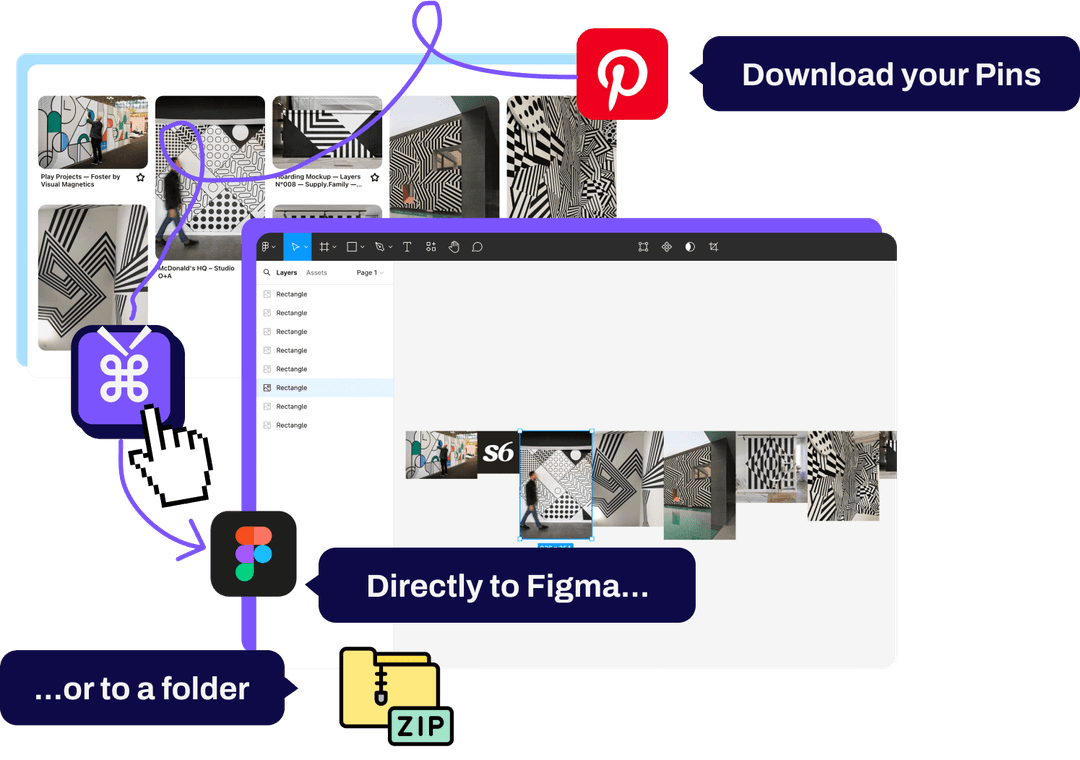
This is Pinpasta's killer feature, and it's included in the free tier, with pastes of up to 30 pins at a time (Pro lifts that cap). Install both the Pinpasta Chrome extension and the Figma plugin, then extract Pinterest boards and paste images directly into Figma without downloading files.
The workflow:
- Navigate to a Pinterest board (any size)
- Click Pinpasta extension → "Extract"
- Open Figma → Run Pinpasta plugin → "Paste" (up to 30 pins per paste on the free plan)
- All images appear in Figma instantly
No other Pinterest downloader—free or paid—offers this. It's exclusive to Pinpasta and available on the free tier. For designers who build moodboards in Figma, this alone makes Pinpasta worth installing. Learn more in our Pinterest to Figma guide.
High-Resolution Image Downloads
Pinpasta works as a Pinterest image downloader—downloading the original full-resolution version of each image. You're not getting thumbnails or compressed previews. Files keep real names (pin id + title), and every ZIP includes a report file listing every pin.
This is the same quality available in the Pro version. Pinpasta doesn't downgrade image resolution for free users.
Works on All Pinterest Content
The free tier works on:
- Public Pinterest boards
- Private Pinterest boards (if you have access)
- Secret boards (if you created them or they're shared with you)
- Pinterest search results
- Individual pins
There are no content restrictions on the free tier. If you can view it on Pinterest, Pinpasta can extract it (first 20 pins per ZIP, 30 pins per Figma paste).
No Ads, No Branding, No Watermarks
Pinpasta's free tier doesn't inject ads, add watermarks to images, or force you to watch videos. It's a clean, ad-free experience identical to the Pro version interface.
What's NOT Included in the Free Pinterest Downloader
To be transparent, here are the limitations of Pinpasta's free tier:
ZIPs Capped at 20 Pins Per Board
The free tier includes ZIP downloads, but each ZIP contains only the first 20 pins of a board. For boards with 40, 60, or 200+ pins, the free ZIP stops at 20. You can curate which 20 pins come first (by rearranging the board before downloading), but you can't get the entire large board as a ZIP for free.
This is the main limitation of the free tier. If your workflow is Figma-based, it's less of a problem—copy to Figma is free up to 30 pins per paste, so a bigger board just takes a few pastes. If you need full boards as files on your hard drive or in cloud storage, you'll need to upgrade.
Pinpasta Pro removes the ZIP cap entirely—download boards of any size, whether it's 50 pins or 1,000+.
No Video Download Support
Pinpasta (both free and Pro) focuses on image extraction. It doesn't support downloading Pinterest videos. If your boards include video pins, those won't be extracted.
This isn't a free vs. Pro limitation—it's a product limitation. If you need video downloads, consider tools like Unpinned or Pin Toolbox. See our Pinterest downloader comparison.
How the Free Pinterest Downloader Compares to Competitors
Is Pinpasta's free tier better than other free Pinterest downloaders? Let's compare:
| Tool | Free Tier Limit | ZIP Download | Figma Integration |
|---|---|---|---|
| Pinpasta Free | 20 pins per ZIP, 30 pins per Figma paste | ✅ First 20 pins (unlimited on Pro) | ✅ Yes |
| Unpinned Free | 50 pins/batch | ✅ Yes | ❌ No |
| Pin Toolbox Free | 15 pins total (demo) | ❌ No | ❌ No |
| WFDownloader | Unlimited (free app) | ✅ Yes | ❌ No |
Pinpasta vs. Unpinned: Unpinned's free tier allows 50 pins per ZIP (more generous than Pinpasta's 20-pin ZIP cap). But it lacks Figma integration. If you use Figma, Pinpasta is better—copy to Figma is free up to 30 pins per paste. If you don't, Unpinned's free tier offers bigger ZIPs. See our Unpinned vs Pinpasta comparison.
Pinpasta vs. Pin Toolbox: Pin Toolbox's "free demo" limits you to 15 pins total—not per batch, total. It's a trial, not a free tier. Pinpasta's 20 pins per ZIP plus 30 pins per Figma paste is far more generous.
Pinpasta vs. WFDownloader: WFDownloader is completely free with no limits, but it's a desktop app that requires technical setup (exporting browser cookies). Pinpasta is easier to use for non-technical users.
When Should You Upgrade to Pinpasta Pro?
The free tier works great for many users, but here's when upgrading to Pro ($29 lifetime) makes sense:
You Need ZIPs of Boards with More Than 20 Pins Regularly
If you frequently work with comprehensive Pinterest boards (50-200 pins) and need them as files, the 20-pin ZIP cap becomes limiting. Pro removes the cap entirely—download ZIPs of boards of any size.
You Need Full-Board ZIP Files
If your workflow requires saving whole boards to your computer, organizing them in project folders, or sharing them via Dropbox/Google Drive, the Pro version's unlimited ZIP downloads are essential.
You Use Pinterest for Client Work
If you're a designer, planner, or creative professional using Pinterest for client projects, the time savings from unlimited ZIP downloads pays for itself on the first project. $29 is less than one hour of billable time for most professionals.
Compare Pinpasta with other tools: Pin Toolbox, Unpinned, or see all options.
You Want to Support the Tool Long-Term
Pinpasta is actively maintained and updated to stay compatible with Pinterest's frequent interface changes. The Pro version (one-time $29 payment) supports ongoing development and ensures the tool remains reliable.
Use Cases: What Can You Do with the Free Pinterest Downloader?
Here are real-world scenarios where Pinpasta's free tier is sufficient:
Small Client Moodboards (20-30 Images)
You're a designer creating a brand identity moodboard. You curate a tight 25-image Pinterest board with color palettes, typography, and photography references. Extract with Pinpasta Free, paste into Figma, arrange into a presentation, and export as PDF. The free tier handles this workflow perfectly.
Personal Inspiration Collections
You're gathering design inspiration for a personal project—home decor, wardrobe planning, recipe ideas. You don't need massive ZIP files. Extract the board, paste into Figma for organization, and you're done. Free tier is sufficient.
Testing Before Committing
You're not sure if a Pinterest downloader fits your workflow. Install Pinpasta Free, test it on a few boards, and see if the Pinterest → Figma workflow saves you time. If it does, upgrade to Pro. If not, you haven't spent anything.
Occasional Pinterest Downloads (Monthly or Less)
You don't download Pinterest boards regularly—maybe once a month for a specific project. The free tier's 20-pin ZIP cap and 30-pin Figma pastes are fine for occasional use, and you don't need to pay for a tool you use infrequently.
How to Get Started with Pinpasta's Free Pinterest Downloader
- Install the Chrome Extension: Visit the Chrome Web Store and install Pinpasta (works on Chrome, Edge, Brave)
- Install the Figma Plugin (Optional but Recommended): Open Figma, search for "Pinpasta" in the Community tab, and install the plugin
- Extract Your First Board: Navigate to any Pinterest board, click the Pinpasta icon, hit "Extract," and watch it process the board
- Paste into Figma: Open Figma, run the Pinpasta plugin, click "Paste," and your images appear instantly
No credit card required. No trial period. The free tier is free indefinitely.
Frequently Asked Questions: Free Pinterest Downloader Chrome
Q: Is Pinpasta's free tier actually free, or is it a trial?
A: It's genuinely free with no time limit. You can use the free tier (20-pin ZIPs, 30-pin Figma pastes) forever without paying.
Q: Can I get more than 20 pins in a ZIP for free?
A: No. The ZIP cap is the first 20 pins of a board. If a board has 60 pins, downloading again gives you the same 20. You'd need Pro for unlimited ZIPs. Copy to Figma is free up to 30 pins per paste, so you can still get a whole board into Figma for free in batches of 30.
Q: Does the free tier include ZIP downloads?
A: Yes, capped at the first 20 pins of a board. ZIPs over 20 pins require Pinpasta Pro ($29 lifetime).
Q: Can I use the free tier for commercial client work?
A: Yes. There are no licensing restrictions. The free tier is free for personal and commercial use. However, remember that Pinterest images are copyrighted—use them for inspiration/moodboards, not final deliverables.
Q: What happens if I try to extract a 50-pin board on the free tier?
A: Copy to Figma still gets you all 50 pins. A ZIP download includes the first 20 pins and tells you the cap was reached. You'd need to upgrade to Pro to ZIP the full board.
Q: Does the free tier show ads or watermark images?
A: No. Pinpasta's free tier is ad-free and doesn't add watermarks to downloaded images.
Q: Can I downgrade from Pro back to Free?
A: Pinpasta Pro is a one-time lifetime payment. Once you pay $29, you have Pro features forever. There's no subscription to cancel or downgrade.
Q: Will Pinpasta Free work on private Pinterest boards?
A: Yes, as long as you're logged into Pinterest and have access to the board. The free tier works on public, private, and secret boards.
Free Pinterest Downloader Chrome Extension: Final Verdict
Pinpasta's free tier is one of the most generous free tools in the Pinterest downloader space. A 20-pin ZIP is enough for most small moodboards and inspiration collections, and direct Figma integration (30 pins per paste on the free plan) is a unique feature not available anywhere else for free.
The limitation is clear: free ZIPs stop at 20 pins per board. If you need bigger ZIPs, the Pro version is a one-time $29 payment with no subscription. But for casual users, Figma-based designers, or anyone testing the Pinterest downloader workflow, the free tier is fully functional and worth installing.
No bait-and-switch. No hidden paywalls. No trial periods. Just a free Pinterest downloader Chrome extension that actually works.
Try Pinpasta free—20-pin ZIPs + 30-pin Figma pastes
No credit card. No trial period. Free tier works forever. Upgrade to Pro ($29 lifetime) when you need unlimited ZIP downloads.