




Pinterest Board Downloader — Download an Entire Board as ZIP or into Figma
Last updated: September 2026
Can you download a whole Pinterest board?
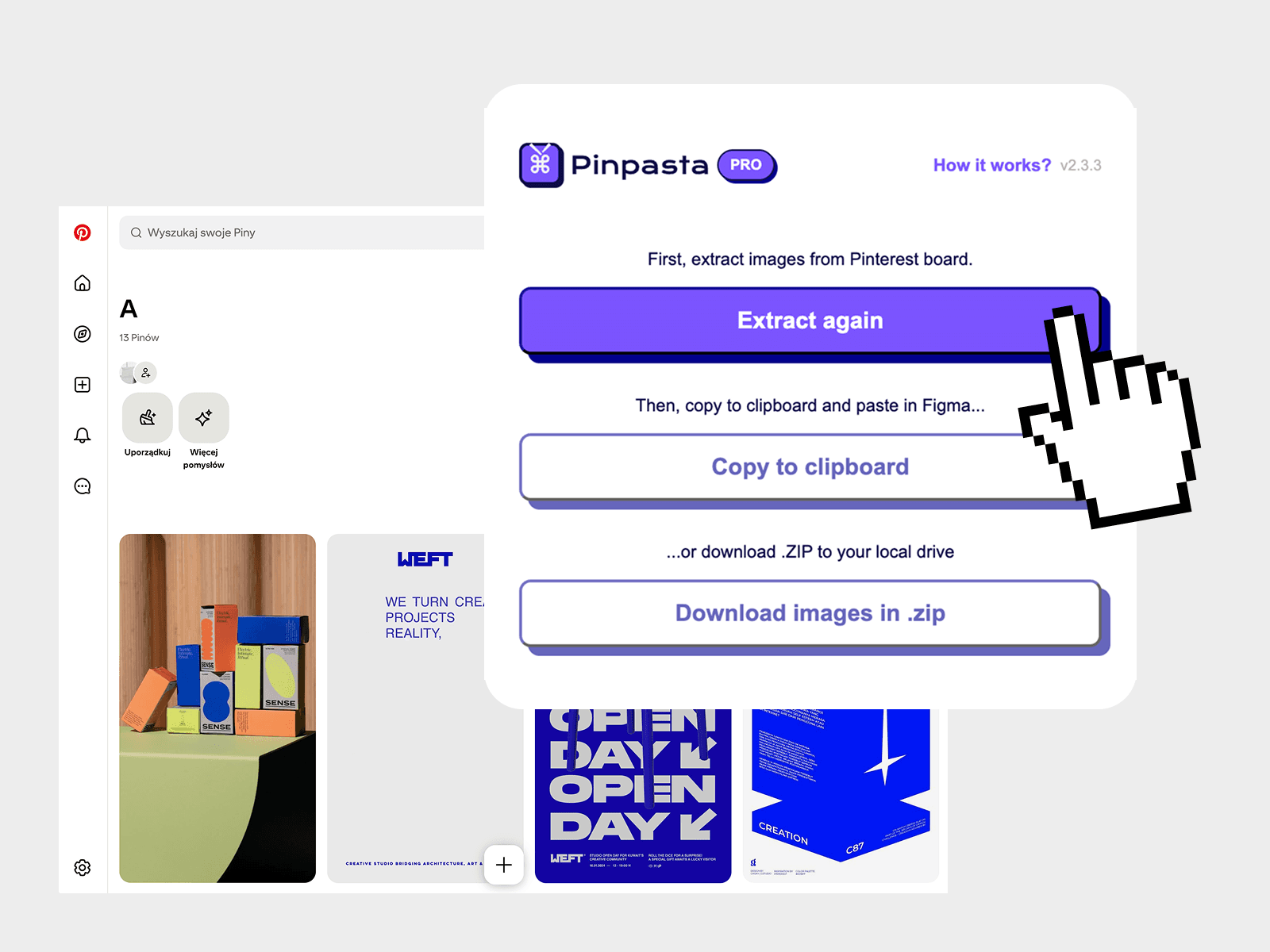
Yes. Pinterest has no "download all" button, but the Pinpasta browser extension (Chrome, Firefox, Edge, Brave) collects every pin on a board and saves it as one ZIP, or pastes the pins straight into Figma. You get Pinterest's full-resolution originals, named by pin and title. Everything runs in your browser. Nothing is uploaded to a server. The free plan covers the first 20 pins of a board per ZIP and 30 pins per paste into Figma. A one-time PRO license removes both caps.
What you get
- Full-resolution originals, real filenames. Pinpasta fetches the original file Pinterest stores for each pin, not the 736px preview you get from right-click. Files are named
001_pinId_title.jpgwith the real extension (.jpg, .png, .webp, .gif or .avif), inside a folder named after the board. A_pinpasta_report.jsonlists every pin with its URL, which file it became, and anything that failed. - Straight into Figma. Click Copy to Figma, open the Pinpasta Figma plugin, paste. The plugin gets the same original URLs the extension fetched, so the pins land on your canvas at full size. No ZIP, no import dialog.
- Whole board or just the pins you pick. Extract everything, or click Pick specific pins to tick pins on the page and add only those to Figma or download only those.
- Runs in your browser. Nothing is uploaded to a server. Pinpasta only talks to Pinterest, from your own browser session. There is no account, no cloud processing, no daily quota.
- Free for the first 20 pins per ZIP. Copy to Figma is free as well, 30 pins per paste. Small boards and moodboards cost nothing.
- Lifetime PRO, one payment. PRO removes the ZIP cap for boards of any size. No subscription.
How to download an entire Pinterest board
Step 1: Install the extension
Get Pinpasta from the Chrome Web Store or Mozilla Add-ons. It works on Chrome, Firefox, Edge, and Brave.
Step 2: Open the board
Go to the Pinterest board you want. Public boards, secret boards you own, and collaborative boards you have been added to all work, logged in or logged out. For a board with sections, open All Pins or one section.
Step 3: Click Extract
Click the Pinpasta icon in the toolbar. The board card shows the board name, its pin count, and what the ZIP will include on your plan. Click Extract. Progress reads "Collected 137 of 412 pins", then a three-step card (check cache, fetch originals, pack ZIP) shows a live count and an ETA. Big boards are paced automatically so Pinterest does not throttle the run; if Pinterest does ask for a pause you see a countdown. A small overlay in the top-right corner of the Pinterest tab shows the same progress, so you can close the popup. Closing it never stops a run. Cancel works at any stage.
Step 4: Download the ZIP or copy to Figma
- Download ZIP saves
boardname_pinpasta_2026-09-09.zip: a folder named after the board with every image as a separate file, plus the report. Run it again later and Pinpasta only fetches pins it does not already have. - Copy to Figma puts the pins on your clipboard. Paste them in Figma or FigJam with the Pinpasta plugin.
Free vs PRO
| Feature | Free | PRO |
|---|---|---|
| ZIP download | First 20 pins of a board | Whole board, any size |
| Copy to Figma | 30 pins per paste | Unlimited |
| Pick specific pins | Yes (ZIP and paste caps apply) | Yes |
| Original resolution | Yes | Yes |
| Named files + report | Yes | Yes |
| Runs in your browser | Nothing uploaded | Nothing uploaded |
| Browsers | Chrome, Firefox, Edge, Brave | Chrome, Firefox, Edge, Brave |
| Price | $0 | $29, one payment, lifetime license. Get PRO |
The 20-pin cap applies to the ZIP, and it always takes the first 20 pins in board order. The free Figma plugin places up to 30 pins per paste; paste again for the next 30, or add a PRO key. A capped free ZIP is named boardname_pinpasta_free_20_of_412.zip so you can see what it holds. If you build small moodboards in Figma, the free plan is all you need. For whole boards, in Figma or on disk, PRO is a single payment you make once.
Image quality: originals, not previews
Pinterest keeps several sizes of every image. The board grid shows a 236px or 474px version, and the pin page shows 736px. Right-click and Save gives you whichever one is on screen. Pinpasta asks for the original upload first, then the largest size variant, then the grid image, and stops at the first one Pinterest serves. On a 981-pin test board every pin came back as the original. When Pinterest refuses an original for a pin, that pin ships at the largest size and the report says which. Files keep the format the pinner uploaded: JPEG, PNG, WebP, GIF, or AVIF. The extension always matches the real format.
Sections, private boards, big boards
- Sections. Open All Pins to get everything, or open one section to download just that part. Pinpasta tells you if a sectioned board has no pins on the page you are viewing.
- Secret boards. Secret boards you own download while you are logged in. Public boards work logged in or out. Nobody is notified.
- Boards with 1,000+ pins. Pinpasta paces requests with a slow start and back-off so Pinterest does not block them. Fetched images are kept in the browser, so a cancelled or interrupted run picks up where it stopped and Download again only fetches what is missing. The ZIP is packed in the tab from stored files rather than held in memory, so there is no practical size ceiling short of the ZIP format's own 4 GB and 65,535 files. Tested at 1,127 listed pins in one run.
- Pin counts. Pinterest's own count for a board often includes pins it no longer shows. When Pinpasta collects fewer than the listed number, it says so instead of pretending.
New in 3.0.0
- Original full-resolution images for every pin, with the fetched URL passed to the Figma plugin.
- ZIPs organised in a folder named after the board, files named by pin and title with the correct file type, and a report listing every pin URL.
- Redesigned popup with one screen per step, Cancel, resume, and an on-page progress view.
- Pick specific pins to download or add to Figma.
- Fixed the version label and the upgrade link.
Other ways to download a board
Right-click, one pin at a time
Works for two or three images. For a full board it takes hours and you get the on-screen size, not the original. See the guide to downloading single Pinterest images if that is all you need.
Other extensions and cloud tools
Pinterest LocalBoard is free and open source, and also fetches originals with named files, but it is Chrome-only, has no Figma export, and cannot resume a run. PinDownCloud and PinBoardSaver are free with daily or per-board caps and sell subscriptions for the rest. We compare them side by side in the best Pinterest board downloaders article, and there is a head-to-head LocalBoard vs Pinpasta review.
Pinterest's data export
Settings, Privacy and data, Request your data. It arrives a day or two later as an account-wide archive of metadata and URLs, not image files. Useful for a full-account backup, not for one board. See how to back up Pinterest boards.
Frequently asked questions
Can I download a whole Pinterest board at once?
Yes. Pinterest has no download-all button, but the Pinpasta browser extension collects every pin on a board and saves it as one ZIP or pastes it into Figma. Open the board, click Extract, then choose Download ZIP or Copy to Figma. The free plan covers the first 20 pins of a board per ZIP and 30 pins per Figma paste. PRO removes both caps.
Can I download a private or secret Pinterest board?
Yes. Secret boards you own download while you are logged in, and collaborative boards you were added to work the same way. Public boards work logged in or logged out. Pinpasta reads the board in your own browser session. Nobody is notified.
What resolution are the downloaded images?
Pinpasta downloads Pinterest's original upload for each pin, not the 736px preview. On a 981-pin test board every pin came back as the original. If Pinterest refuses an original, that pin falls back to the largest size available and the report in the ZIP says which. Files keep their real format and extension: JPEG, PNG, WebP, GIF, or AVIF.
Does it work on boards with sections?
Yes. Open the board's All Pins view to download everything, or open one section to download only that part. If a sectioned board shows no pins on the page you are on, Pinpasta tells you to open All Pins or a section.
Can I send a Pinterest board straight to Figma?
Yes. Click Copy to Figma in the extension, then paste in Figma or FigJam with the free Pinpasta Figma plugin. The plugin receives the same original URLs the extension fetched, so pins are placed at full resolution. You can also Pick specific pins on the page and add only those. The free plugin places up to 30 pins per paste; PRO removes that cap.
Download an entire Pinterest board now
Originals, real filenames, straight into Figma. Runs in your browser. Free for the first 20 pins per ZIP and 30 pins per Figma paste. PRO is $29, once.