




Pin Toolbox vs Pinpasta: Honest Pinterest Downloader Comparison
Last Updated: September 2026
If you're looking for a Pinterest board downloader, Pin Toolbox and Pinpasta are the two most popular browser extensions. Both download all pins from a board in bulk, both handle large boards, and both save you hours compared to manual downloading. But they target different users and solve slightly different problems—and Pinpasta is now available on Firefox as well as Chrome, while Pin Toolbox remains Chrome-only. This Pin Toolbox vs Pinpasta comparison breaks down features, pricing, and use cases so you can choose the right tool for your needs.
Pin Toolbox vs Pinpasta: Feature Comparison Table
Let's start with a side-by-side comparison of the core features:
| Feature | Pinpasta | Pin Toolbox |
|---|---|---|
| Pricing | Free (20 pins per ZIP, 30 pins per Figma paste) Pro: $29 lifetime | Free demo (15 pins) $14.99/month subscription |
| Bulk Image Download | ✅ Yes (unlimited on Pro) | ✅ Yes (unlimited) |
| ZIP Export | ✅ Yes (free up to 20 pins, unlimited on Pro) | ✅ Yes |
| Video Download | ❌ No | ✅ Yes |
| Figma Integration | ✅ Yes (direct paste) | ❌ No |
| PDF Export | ✅ Yes (Pro) | ✅ Yes |
| Print Boards | ❌ No | ✅ Yes |
| Max Pins per Board | 1,000+ pins supported | 1,000+ pins supported |
| Browser Support | Chrome, Firefox, Edge, Brave | Chrome (primarily) |
| Free Tier Limit | 20 pins per ZIP, 30 pins per Figma paste | 15 pins total (demo) |
Pricing: Subscription vs. Lifetime License
The biggest difference between Pin Toolbox vs Pinpasta is the pricing model. This isn't just about cost—it's about how you prefer to pay for software.
Pin Toolbox: $14.99/Month Subscription
Pin Toolbox uses a monthly subscription model. You pay $14.99 every month for full access. This includes all features: unlimited downloads, video support, PDF export, and printing. The free demo lets you try it with a 15-pin limit, but you'll need to subscribe for serious use.
Cost Analysis:
- 1 month: $14.99
- 6 months: $89.94
- 1 year: $179.88
- 2 years: $359.76
If you only need Pinterest downloads for a one-off project or a single month, Pin Toolbox's subscription can be cost-effective—pay for one month and cancel. But if you download Pinterest boards regularly over time, the subscription adds up fast.
Pinpasta: $29 Lifetime (One-Time Payment)
Pinpasta offers a lifetime license model. You pay $29 once and own the Pro version forever. No recurring fees, no subscription fatigue, no surprise charges.
The free tier gives you ZIP downloads of the first 20 pins per board and Figma pastes of up to 30 pins at a time. For most casual users, this is enough to test the tool and handle small boards. If you need to remove both caps, the $29 Pro upgrade is a one-time cost.
Break-Even Analysis: If you use Pin Toolbox for more than 2 months ($14.99 x 2 = $29.98), Pinpasta becomes cheaper. Over a year, Pinpasta saves you $150 compared to Pin Toolbox.
Which Pricing Model Is Right for You?
Choose Pin Toolbox's subscription if:
- You need Pinterest downloads for a short-term project (1-2 months)
- You want to test a paid tool with the option to cancel quickly
- Your company pays for subscriptions as expensed software
Choose Pinpasta's lifetime license if:
- You download Pinterest boards regularly (monthly or more often)
- You prefer one-time purchases over recurring subscriptions
- You're budget-conscious and want the lowest long-term cost
Video Download Support: Pin Toolbox's Advantage
If you download Pinterest video content, Pin Toolbox has a clear advantage. It supports video extraction from Pinterest pins—something Pinpasta doesn't currently offer.
Pinterest videos are popular in categories like recipes, DIY tutorials, fashion, and fitness. If your Pinterest boards include video pins and you need to save them offline, Pin Toolbox is the only option between these two tools.
However, most Pinterest use cases focus on images, not videos. Designers, creative directors, and planners typically curate image-based boards for moodboards, inspiration, and client presentations. For these workflows, Pinpasta's image-only focus isn't a limitation.
When video support matters: Content creators, recipe bloggers, tutorial curators, and anyone working with Pinterest's video-heavy categories.
When video support doesn't matter: Designers, interior designers, wedding planners, creative directors building visual moodboards and inspiration boards.
Figma Integration: Pinpasta's Unique Feature
Pinpasta is the only Pinterest downloader—including Pin Toolbox—that offers direct Figma integration. This is a major workflow advantage for designers.
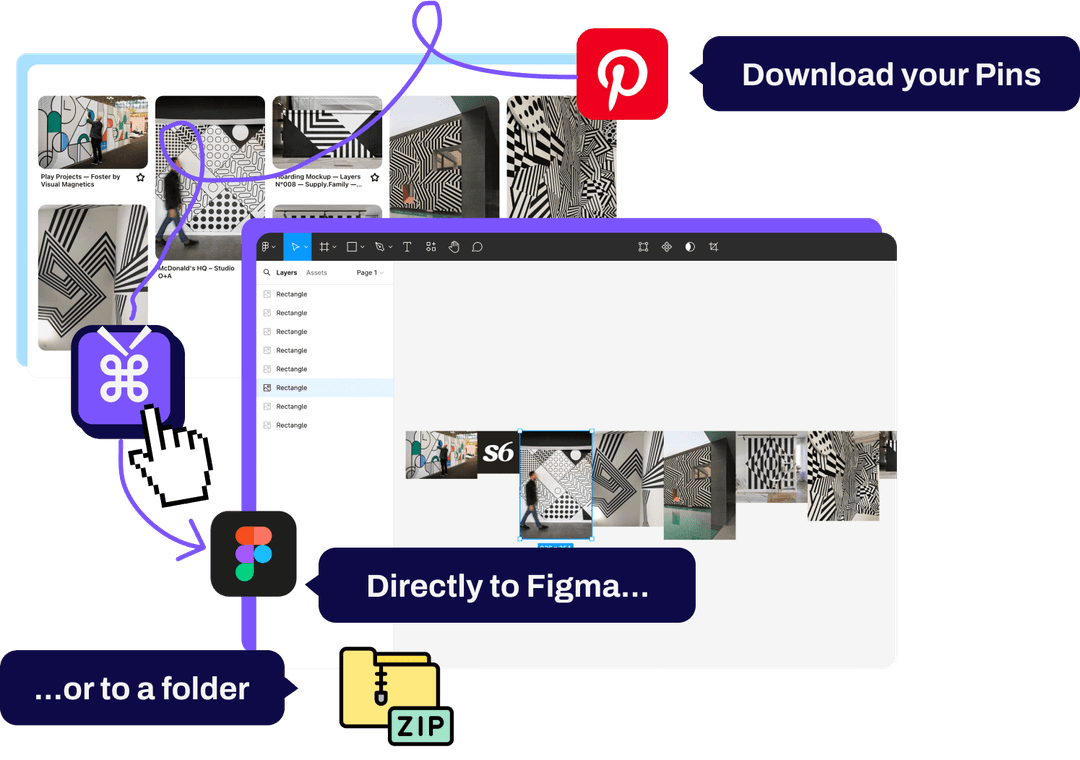
With Pinpasta, you can extract Pinterest boards in Chrome and paste them directly into Figma or FigJam using the companion Figma plugin. No downloading, no unzipping, no manual importing. Pinterest inspiration flows directly into your design workspace.
Pin Toolbox doesn't have Figma integration. You download a ZIP file and then manually import images into Figma. This isn't difficult, but it adds friction to the workflow. For designers who live in Figma and use Pinterest for inspiration gathering, Pinpasta's direct integration is a significant time-saver.
Learn more about the Pinterest to Figma workflow in our detailed guide.
When Figma integration matters: UX/UI designers, brand designers, creative directors, anyone building moodboards in Figma or running FigJam workshops.
When Figma integration doesn't matter: Users who don't use Figma, or who prefer organizing downloads in folders rather than design tools.
PDF Export and Printing
Pin Toolbox includes PDF export and board printing. These let you generate PDF documents of Pinterest boards or send boards directly to a printer—useful for offline presentations or physical mood boards.
Pinpasta Pro exports PDFs too. After you extract a board, Download PDF saves the original images as one PDF, one image per page or six per page, on A4 or US Letter, with every image linked back to its pin. A "Smaller file" option keeps the PDF light enough to email. On the free plan you can still make a PDF from the ZIP or from Figma; our guide on how to save a Pinterest board as a PDF covers every method.
The difference is printing and price. Pinpasta has no print button, so you open the PDF and print it from there. And PDF export comes with Pinpasta's one-time license, where Pin Toolbox includes it in the monthly subscription.
When Pin Toolbox's print button matters: You print boards often and want to skip the PDF step.
Ease of Use and Interface
Both Pin Toolbox and Pinpasta are browser extensions with similar workflows: navigate to a Pinterest board, click the extension icon, extract the content. Neither tool requires a steep learning curve.
Pinpasta's interface is minimal. After extraction you get "Copy to Figma," "Download ZIP" and, on Pro, "Download PDF." The simplicity is intentional—fewer choices mean faster decisions.
Pin Toolbox's interface offers more options (print, video settings), which makes it slightly more complex. This isn't necessarily a disadvantage—power users appreciate options—but it does mean a small learning curve to understand which export format to use.
Both tools handle large boards well. Both show progress indicators during extraction. Both work reliably on modern Chrome-based browsers. From a usability standpoint, they're roughly equivalent—the choice comes down to which features you need, not which interface is easier.
Free Tier Comparison
Both tools offer free tiers, but with different limits:
Pinpasta Free: ZIP downloads of the first 20 pins per board, copy to Figma up to 30 pins per paste. This is a genuine free tier—you can use it indefinitely for small boards or for pasting boards into Figma 30 pins at a time.
Pin Toolbox Free Demo: 15-pin limit total (not per batch—15 pins across all uses). This is more of a trial than a free tier. You can test the tool, but you'll need to subscribe for ongoing use.
If you want to try before you buy, Pinpasta's free tier is more generous. If you only need to download a handful of pins once, Pin Toolbox's demo might be enough.
Who Should Choose Pin Toolbox?
Pin Toolbox is a better choice if you:
- Need video download support: If your Pinterest boards include videos and you need to save them, Pin Toolbox is your only option in this comparison.
- Print boards directly: If you print physical mood boards often, Pin Toolbox's print button skips the PDF step.
- Only need Pinterest downloads short-term: If you're working on a one-month project and don't expect to use the tool long-term, paying $14.99 for one month is cheaper than Pinpasta's $29 lifetime license.
- Prefer subscription billing: Some businesses prefer monthly subscriptions for budget predictability and expensing purposes.
Who Should Choose Pinpasta?
Pinpasta is a better choice if you:
- Use Figma for design work: The direct Pinterest to Figma integration is exclusive to Pinpasta and eliminates the download/import workflow entirely.
- Download Pinterest boards regularly: If you use Pinterest frequently (weekly or monthly), Pinpasta's $29 lifetime license is far cheaper long-term than Pin Toolbox's subscription.
- Work primarily with images, not videos: If your Pinterest boards are image-based (most design, planning, and inspiration use cases), you don't need Pin Toolbox's video support.
- Need board PDFs without a subscription: Pro exports a whole board as a PDF of original images, included in the one-time license.
- Prefer one-time payments over subscriptions: If you're tired of SaaS subscription fatigue, Pinpasta's lifetime model is refreshing.
- Want a generous free tier: Pinpasta's free tier (20 pins per ZIP, 30 pins per Figma paste, no lifetime cap) beats Pin Toolbox's 15-pin demo.
Can You Use Both Tools?
Technically, yes—you can install both Pin Toolbox and Pinpasta as browser extensions and use them for different purposes. Note that Pin Toolbox is Chrome-only, while Pinpasta is available for both Chrome and Firefox. For example:
- Use Pinpasta for image-based boards and Figma workflows
- Use Pin Toolbox for video downloads or printing when needed
However, most users don't need this level of complexity. Choose the tool that best matches your primary workflow and stick with it.
Frequently Asked Questions About Pin Toolbox vs Pinpasta
Q: Which is cheaper: Pin Toolbox or Pinpasta?
A: For short-term use (1-2 months), Pin Toolbox is cheaper at $14.99/month. For long-term use (3+ months), Pinpasta's $29 lifetime license is significantly cheaper. Over one year, Pinpasta saves you $150.
Q: Does Pinpasta support video downloads like Pin Toolbox?
A: No. Pinpasta focuses on image extraction and does not currently support Pinterest video downloads. If you need video support, Pin Toolbox is the better choice.
Q: Can I use Pin Toolbox with Figma?
A: Pin Toolbox doesn't have direct Figma integration. You can download images as a ZIP file and manually import them into Figma, but this is slower than Pinpasta's one-click paste workflow.
Q: Which tool handles large Pinterest boards better?
A: Both Pin Toolbox and Pinpasta handle large boards (1,000+ pins) reliably. Performance is comparable—the choice comes down to features and pricing, not board size limits.
Q: Is Pin Toolbox's $14.99/month subscription worth it compared to Pinpasta's lifetime license?
A: It depends on how often you use Pinterest. If you only need downloads occasionally (a few times per year), subscribing to Pin Toolbox for one or two months might be cheaper. But if you download Pinterest boards monthly or weekly, Pinpasta's lifetime license pays for itself in two months.
Q: Does either tool violate Pinterest's terms of service?
A: Both tools access publicly available Pinterest content through standard web protocols. However, downloaded images are subject to copyright, so use them responsibly for inspiration and reference rather than commercial redistribution.
Q: Can I cancel Pin Toolbox's subscription anytime?
A: Yes. Pin Toolbox is a monthly subscription that you can cancel anytime. If you only need Pinterest downloads for a short project, this flexibility is useful.
Q: Which tool has better customer support?
A: Both tools offer email support. Response times and quality vary, but neither has a reputation for poor support. Check recent reviews on the Chrome Web Store for current user feedback.
Final Verdict: Pin Toolbox vs Pinpasta
There's no universal "better" tool—it depends on your specific needs.
Choose Pin Toolbox if: You need video download support or direct printing. Or if you only need Pinterest downloads for 1-2 months and want the flexibility of a monthly subscription.
Choose Pinpasta if: You're a designer who uses Figma and wants the fastest workflow from Pinterest to design tool. Or if you download Pinterest boards regularly and want the lowest long-term cost with a lifetime license.
For most creative professionals—designers, creative directors, planners—Pinpasta offers better value and workflow integration. The direct Figma paste feature alone is worth it if you build moodboards in Figma. And the lifetime pricing model means you pay once and never think about it again.
For a broader comparison of all tools, see our Best Pinterest Board Downloader guide. Or compare Unpinned vs Pinpasta.
If you need video support specifically, Pin Toolbox is the better choice. But for the majority of Pinterest use cases (downloading image boards for design inspiration), Pinpasta is the more practical tool.
Try Pinpasta's free tier (20-pin ZIPs, 30-pin Figma pastes) and see if it fits your workflow. If it does, the $29 Pro upgrade is one of the better deals in creative software.
Try Pinpasta free—20-pin ZIPs, 30-pin Figma pastes
Download Pinterest boards in one click. Send images directly to Figma. No subscription. $29 lifetime for Pro. Start free, upgrade when you need it.