




Pinterest Wedding Board Downloader: Create Client Inspiration Boards Fast
Last Updated: March 2026
As a wedding planner, Pinterest is where inspiration lives. Every engaged couple arrives at your first meeting with Pinterest boards—"Rustic Barn Wedding," "Boho Garden Ceremony," "Elegant Black-Tie Reception." These boards guide your design direction, vendor selection, and timeline planning. But when it's time to create a cohesive proposal or vendor brief, you need those images out of Pinterest and into presentation decks, vendor emails, or shared client folders. Manually downloading hundreds of wedding inspiration images is painfully slow. Here's how wedding planners are using Pinpasta as a Pinterest wedding board downloader to turn client inspiration boards into actionable proposals in minutes.
Why Wedding Planners Need a Pinterest Wedding Board Downloader
Wedding planning lives on Pinterest. Couples spend months curating boards before they even book a planner. Your discovery calls often start with "Here's my Pinterest board—can you make this happen?"
These Pinterest wedding boards become your project brief. They tell you the couple's aesthetic preferences, color palette, floral styles, decor expectations, and vibe. But Pinterest doesn't export cleanly. You can't email a Pinterest board to a florist or caterer. You can't print it for an on-site vendor walkthrough. You can't import it into your planning software or proposal templates.
The traditional workflow means hours of manual downloading:
- Right-click each ceremony backdrop idea → save image
- Right-click each reception centerpiece → save image
- Right-click each invitation suite example → save image
- Organize 80-150 images into folders by category
- Import into PowerPoint, Canva, or PDF for client delivery
For a typical wedding with 5-6 Pinterest boards (Ceremony, Reception, Florals, Attire, Invitations, Details), this process takes 3-4 hours. That's billable time wasted on file management instead of actual planning.
How Pinpasta Works as a Pinterest Wedding Board Downloader
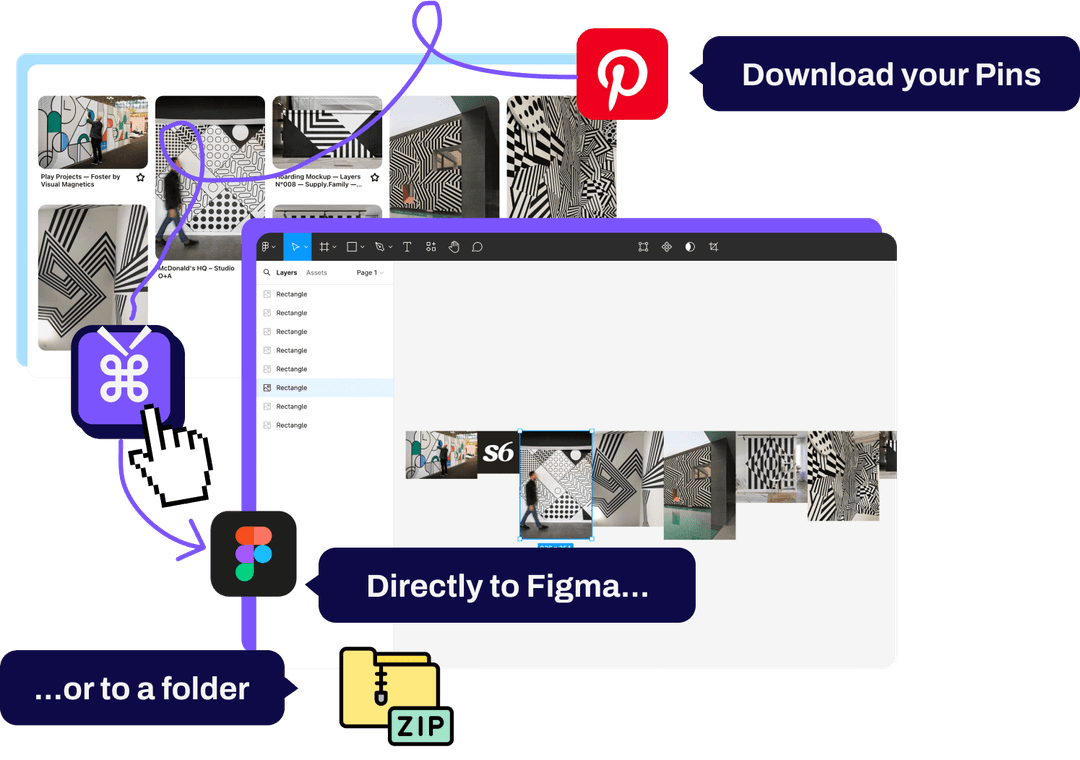
Pinpasta is a browser extension (available for Chrome and Firefox) that downloads entire Pinterest boards in one click. Navigate to any wedding Pinterest board, click the extension icon, hit "Extract," and download all images as a ZIP file or send them directly to Figma for moodboard creation.
Here's the step-by-step workflow for wedding planners:
Step 1: Ask Clients to Share Pinterest Boards During Discovery
During your initial consultation, ask couples to share links to their Pinterest wedding boards. Most will already have them organized by theme: Ceremony, Reception, Florals, Attire, Stationery, Details.
Step 2: Extract Each Board with Pinpasta
Open each Pinterest board in your browser. Click the Pinpasta icon and hit "Extract." Pinpasta works as a Pinterest board downloader: it processes all pins—whether it's 30 images or 300—and grabs the original full-resolution version of each.
Typical extraction times:
- 30-pin board (small themed board): 15-30 seconds
- 80-pin board (standard wedding inspiration board): 1-2 minutes
- 200-pin board (comprehensive ceremony + reception board): 3-4 minutes
Step 3: Download as ZIP or Send to Figma
After extraction, choose your workflow:
Option A: Download ZIP files (free for the first 20 pins of a board; ZIPs over 20 pins require Pinpasta Pro, $29 lifetime)
All images are packaged into a labeled ZIP file. Unzip and import into PowerPoint, Canva, Aisle Planner, HoneyBook, or whatever planning software you use. You can also share ZIP files with vendors via email or Dropbox.
Option B: Send to Figma (free with Pinpasta + Figma plugin)
If you create client moodboards in Figma, click "Copy to Figma" and all images paste directly into your workspace. Arrange them into presentation frames, add notes, and share with clients or vendors. Learn more about Pinterest to Figma workflow.
Common Wedding Planning Use Cases for Pinterest Board Downloads
Creating Client Proposal Decks
After the discovery call, you create a proposal deck that shows: "Here's what I understand from your vision." Use Pinpasta to download their Pinterest boards, then arrange key images into a proposal presentation. Add your commentary: "Ceremony backdrop: romantic floral arch with cascading greenery and white roses" next to their pinned example.
This visual confirmation builds client confidence. They see that you understand their aesthetic before they've even signed the contract.
Vendor Briefing and RFPs
When reaching out to florists, caterers, or rental companies, you need to communicate the couple's style. Instead of writing "They want a rustic, organic vibe," attach 8-10 visual references from their Pinterest board.
Download the relevant Pinterest board with Pinpasta, select the strongest examples, and include them in your vendor RFP email. Vendors can quote more accurately when they see actual visual references instead of vague descriptions.
Day-of Design Briefs
For day-of coordination, you create design briefs for setup teams: florists, rental companies, decorators. These briefs need visual references. Use Pinpasta to download Pinterest boards, then create annotated PDFs showing exactly how centerpieces should be styled, how table settings should be arranged, and how the ceremony backdrop should look.
Client Inspiration Lookbooks
Some wedding planners create printed lookbooks for clients—a physical collection of inspiration images organized by theme. Download the couple's Pinterest boards with Pinpasta, import into InDesign or Canva, and design a beautiful spiral-bound lookbook. Clients love having a tangible reference they can bring to dress fittings, vendor meetings, or show to bridal party members.
Organizing Downloaded Pinterest Wedding Boards
When you download multiple Pinterest boards for a single wedding, organization is critical. Here's a recommended folder structure:
Project Folder: Smith-Jones Wedding (June 2026)
- Pinterest Boards/
- 01_Ceremony
- 02_Reception
- 03_Florals
- 04_Attire
- 05_Invitations
- 06_Details
- Vendor Briefs/
- Client Proposals/
- Timeline/
Each time you extract a Pinterest board with Pinpasta, save the ZIP file into the appropriate subfolder. This keeps everything organized for easy reference throughout the planning process.
Using Pinterest Wedding Boards for Mood Board Creation
Many wedding planners create formal moodboards for clients—polished, designed presentations that translate Pinterest inspiration into a cohesive visual plan.
The workflow with Pinpasta:
- Extract the client's Pinterest boards using Pinpasta
- Curate the strongest 20-30 images that best represent their vision
- Import into Figma, Canva, or PowerPoint
- Organize by section: Ceremony, Reception, Color Palette, Florals, Details
- Add text overlays, vendor notes, or budget estimates
- Export as PDF and send to client for approval
This transforms a scattered Pinterest board into a professional planning document. Clients see their vision organized and validated by a professional. Read more about creating moodboards from Pinterest.
Collaborating with Couples on Pinterest Boards
Some wedding planners create collaborative Pinterest boards with couples. You set up boards for each wedding element, invite the couple to contribute, and curate together over weeks or months.
This collaborative approach has benefits:
- Couples feel involved in the design process
- You see their taste evolve in real-time
- Decisions are documented visually (reduces "I thought we agreed on X" confusion)
However, collaborative boards can get messy—couples sometimes pin conflicting styles or unrealistic expectations (champagne taste, beer budget). Use Pinterest sections to organize their contributions vs. your professional recommendations. When creating the final design brief, extract the entire board with Pinpasta but curate selectively.
Pinterest Wedding Board Downloader: Free vs. Pro
Pinpasta offers both free and Pro tiers:
Pinpasta Free:
- ZIP download of the first 20 pins per board
- Copy to Figma, up to 30 pins per paste (requires Figma plugin installation)
- ZIPs over 20 pins require Pro
This is useful for Figma moodboards (pasted 30 pins at a time) and for ZIPs of small themed boards (invitation inspiration, hair/makeup ideas), but limiting if you need ZIPs of comprehensive wedding boards that often have 60-150 pins.
Pinpasta Pro ($29 lifetime):
- Unlimited ZIP downloads (no 20-pin cap)
- Unlimited copy to Figma (no 30-pin paste cap)
- One-time payment, no subscription
For wedding planners who work with Pinterest boards regularly (every new client brings 4-6 boards), the Pro version pays for itself on the first wedding. $29 lifetime is less than one hour of billable planning time.
Tips for Wedding Planners Using Pinterest Boards
Set Expectations Early
Tell couples upfront: "Pinterest is great for inspiration, but not everything is realistic within your budget or venue constraints." Use downloaded boards to have honest conversations about what's achievable vs. aspirational.
Curate, Don't Just Download Everything
Couples often pin 200+ ideas across multiple boards. Don't download all of them. Review their boards, identify the strongest 30-40 images that represent a cohesive direction, and extract those. Quality over quantity.
Use Boards for Vendor Communication
Learn more about backing up important boards and creating professional moodboards.
When briefing vendors (florists, rental companies, caterers), include 5-8 visual references from the couple's Pinterest board. This reduces miscommunication and helps vendors quote accurately.
Backup Important Boards
Pinterest accounts get hacked, boards get accidentally deleted, pins disappear when linked websites go offline. For high-value weddings, download and backup the couple's Pinterest boards early in the planning process. Store ZIPs in your project folder. Learn more about backing up Pinterest boards.
Frequently Asked Questions: Pinterest Wedding Board Downloader
Q: Can I download a couple's private Pinterest wedding board?
A: Yes, as long as they've shared the board with you (or made it public) and you're logged into Pinterest. Pinpasta can extract private, secret, and collaborative boards.
Q: How do I share downloaded Pinterest boards with vendors?
A: Use Pinpasta to download the board as a ZIP file. Upload the ZIP to Google Drive, Dropbox, or email it directly to vendors. Alternatively, create a PDF moodboard using the images and share that.
Q: What if the couple's Pinterest board has 300+ pins?
A: Pinpasta handles large boards reliably (1,000+ pins supported). However, downloading 300 images may be overkill. Curate the board first—identify the strongest examples and extract a focused subset rather than the entire board.
Q: Can I use downloaded Pinterest images in printed client proposals?
A: For internal planning documents and client proposals, using Pinterest images as visual references is generally acceptable. Don't use them in public marketing materials or redistribute them commercially without proper licensing.
Q: Will Pinpasta work with Pinterest video pins (ceremony entrance ideas, first dance videos)?
A: No, Pinpasta currently supports image downloads only, not videos. If the couple's board includes video pins, those won't be extracted.
Q: How do I organize downloads from multiple Pinterest boards for one wedding?
A: Create a project folder for the wedding, then subfolders for each board theme (Ceremony, Reception, Florals, etc.). Extract each board separately with Pinpasta and save the ZIP files to the appropriate subfolder.
Transform Your Wedding Planning Workflow
Pinterest wedding boards are essential for modern wedding planning, but the platform isn't built for professional workflows. Pinpasta solves this—turning client inspiration boards into actionable planning documents in minutes, not hours.
Whether you create proposals in PowerPoint, moodboards in Figma, or vendor briefs in Canva, Pinpasta streamlines the extraction process. No more manual downloading. No more wasted billable hours on file management.
The free version covers Figma pastes of up to 30 pins at a time and ZIPs of the first 20 pins per board. For ZIPs of comprehensive wedding boards with 60-150 pins, Pinpasta Pro is a one-time $29 payment. That's less than one hour of planning fees, and it saves you 2-3 hours per wedding.
Install Pinpasta, extract your next client's wedding board, and get back to what you do best: creating unforgettable celebrations.
Wedding planners: download client Pinterest boards in seconds
Extract entire wedding inspiration boards, create vendor briefs, build client moodboards fast. Free ZIP of the first 20 pins per board and Figma pastes of up to 30 pins at a time; $29 lifetime removes both caps. Built for wedding pros.